The school bell rings at 3:05. You're in a meeting that ran long, or the traffic is worse than expected, and suddenly you realize — nobody's there to get them yet. It happens to good parents on busy days. The problem is rarely care; it's that a one-time alarm at 2:55 gets swiped away during the morning rush and never seen again. Here's how to make the pickup time stay in front of you.
Why pickup reminders fail
A normal phone alarm does its job for about ten seconds. You dismiss it, and it's gone — while the actual pickup is still two hours away. By then a dozen other notifications (a work email, a weather alert, a group chat) have buried the thought. The fix isn't a louder alarm; it's a reminder that doesn't leave until the kid is in the car.
Pin the pickup time where you'll see it
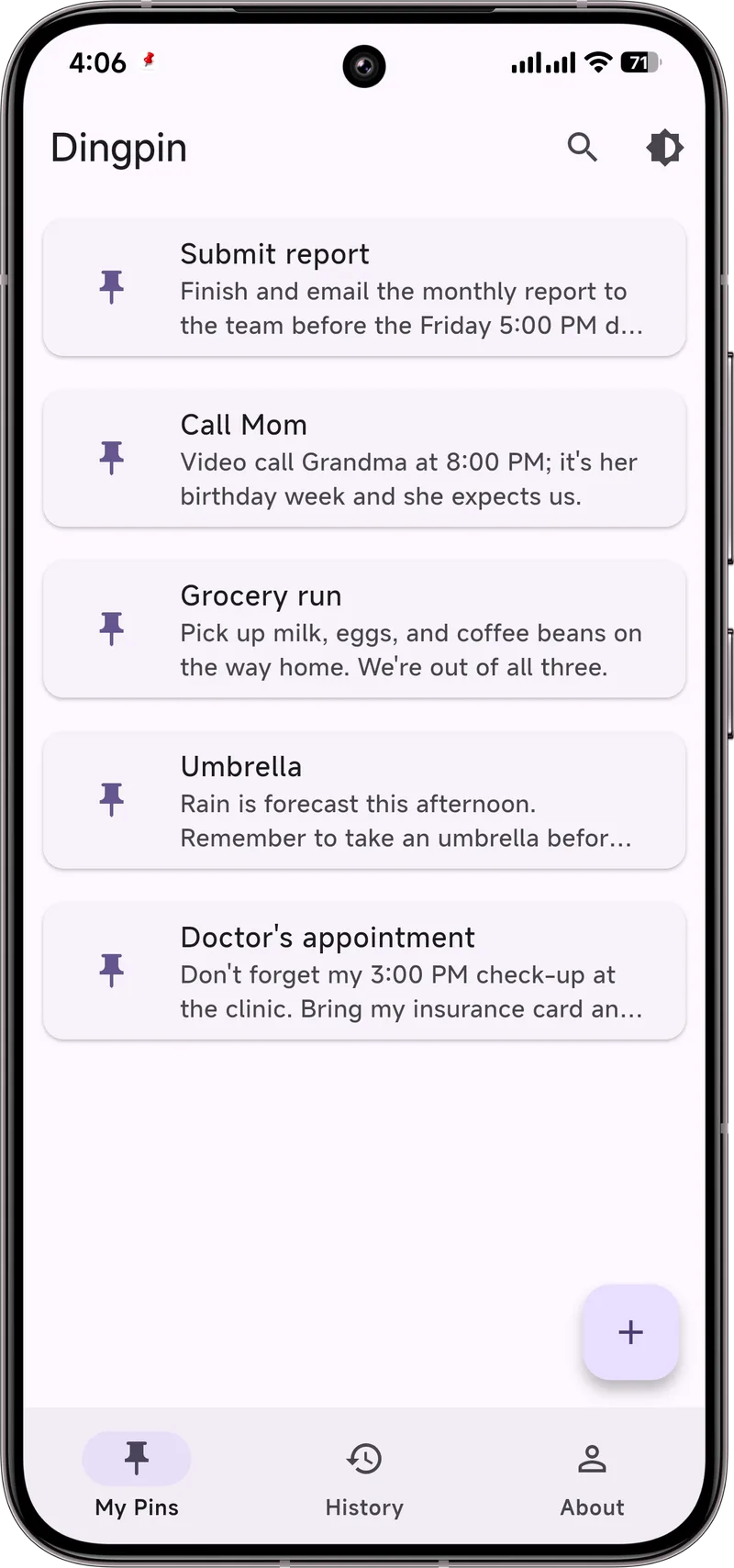
With Dingpin, you pin a reminder so it sits at the top of your notification shade all day — above the noise, impossible to scroll past. Something plain like:
"Pick up Mia — 3:05, Lincoln Elementary. Call Grandma if I'm 10 min late."
Because it's pinned, it's the first thing you see every time you check your phone, not a memory you have to summon. Set it the night before or the morning of; it stays put until you clear it.
Add the backup plan
The reminder helps you remember, but a pinned note isn't a safety system. Pair it with a real backup so a late day never becomes a lost one:
- A second pinned note with the backup person's name and number: "If late, call Grandma (555‑0102) or neighbor Sam."
- A shared calendar invite with your co-parent or the after‑school program, so someone else sees the time too.
- A word with your child about exactly what to do if no one's at the gate yet — wait inside, call the office, text you. A short script beats panic.
Dingpin is the layer that keeps the plan visible on your side; the people and the plan are what actually catch the kid.
For older kids: a note on their own phone
If your child carries a phone, the same trick works for them. Pin a quiet note on their device — "Text Dad when you're out at 3:05" — so the end‑of‑day nudge is on their screen, not yours alone. Keep it short and plain; you're building a habit, not adding homework.
Why school pickup reminders fail
School pickup is a high-stakes daily event. Reminders fail for the same reasons other reminders fail:
- Generic phrasing ("Pickup time!") is easy to dismiss mentally.
- The reminder gets buried under other notifications.
- There is no visible cue that the task is still pending.
Make reminders specific
A specific reminder sticks better than a generic one. Examples:
- "Pickup at 3:15pm — Gate B, Maria's class."
- "Walking to pickup. ETA 10 min."
- "At pickup. Confirm with teacher before leaving."
Use Google Calendar for the first, a chat-app reminder for the second, and Dingpin for the third (pinned until you confirm).
Pin the reminder until done
The most reliable pattern: when the reminder fires, pin it with Dingpin. The pinned item stays at the top of the shade until you have actually done the pickup. The visible pinned status is the cue that the task is still pending.
Pair with a physical anchor
A physical cue reinforces the reminder:
- Keys. Put your car/house keys next to the phone the night before. When the reminder fires, you see the keys.
- Bag. The child's bag is already packed the night before; the reminder is the cue to grab it.
For shared pickup duties
If pickup alternates between caregivers, the shared calendar pattern works well. Both caregivers see the same event; whichever is on duty gets the reminder. Pin it on the day-of and unpin only when the handoff is confirmed.
School app notifications
Many schools have their own apps (Seesaw, ClassDojo, etc.). These post notifications for closures, early dismissals, and reminders. Pin the critical ones (early dismissal) so they are visible above other noise. See also: medication reminders that stick and setting up a parent's phone.
Official documentation
If you want to check anything against the source, these are the pages this guide is based on:
FAQ
Is a pinned reminder enough on its own?
It helps you remember, but it isn't a safety system. For real pickup reliability, also set a calendar alert, share the schedule with a co-parent or backup person, and teach your child what to do if no one's there yet.
Can I pin a reminder on my child's phone too?
Yes — if they have a phone, pinning a "text Dad when you're out" note on their side gives them a visible nudge at the end of the day. Keep it short and plain.
Is Dingpin private?
Yes. It runs on the device, needs no account, and nothing is uploaded. It's a reminder layer, not a tracker.