Notification fatigue is real. The good news: Android lets you dial alerts down as far as you want — from silencing a single noisy app to quieting your whole phone. Here is how to turn notifications off, the right way for each situation.
Turn off vs mute (know the difference)
Before you start, two terms that get mixed up:
- Turn off: the notification disappears entirely — no banner, no sound, no badge.
- Mute: the notification still appears but makes no sound (see how to mute per app).
If you want to keep seeing an alert but stop the interruption, mute it. If you never want to see it, turn it off.
Turn off one app
- Open Settings.
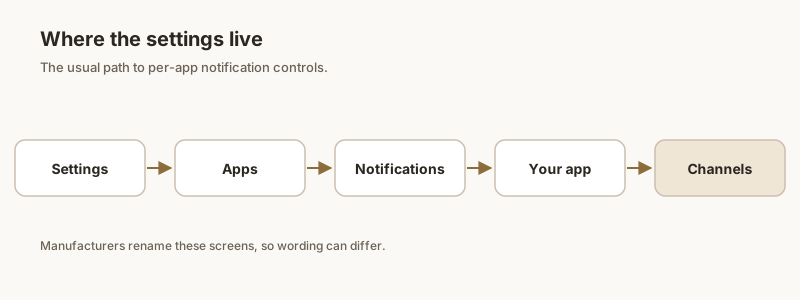
- Tap Notifications → App notifications (or Apps & notifications → [app] → Notifications).
- Find the app and switch its master toggle off.
Fastest shortcut: long-press the app icon → App info → App notifications → toggle off. This jumps straight to that app without scrolling the full list.
Turn off a category (channel)
Most apps split alerts into channels — think "Messages" vs "Promotions" vs "Recommendations". You can turn off just the annoying one and keep the rest:
- Settings → Notifications → [app].
- Tap the category you want to silence.
- Set its importance to Silent or toggle it off entirely.
This is the smartest move for apps like shopping or social, where you care about a direct message but not the "we miss you" blasts.
Turn off everything at once
There is no single switch that disables every app simultaneously — Android expects you to manage them per app. The practical alternatives:
- Do Not Disturb / Focus: silences all alerts without deleting them. Great for sleep or meetings, and you can allow only priority contacts through.
- Bulk toggles: some OEM launchers (Samsung, Xiaomi) offer "manage all" lists where you can flip many apps quickly, but behavior varies by device.
Keep only what matters
Turning everything off risks missing the one alert that counts — a one-time password, a delivery, a message from family. Instead of a blanket shutdown, Dingpin lets you pin the notifications that matter so they stay pinned at the top of your shade, while you freely mute or turn off the noise elsewhere. It is a quieter phone without the anxiety of "did I miss something?".
Global vs. app-level
Two ways to turn off notifications:
- Globally. DND silences everything (with exceptions). Best for quiet hours or focus sessions.
- Per app. Settings → Apps → [app] → Notifications → off. Best for permanently silencing noisy apps.
Use DND for temporary silence and per-app toggles for permanent decisions.
DND quick toggles
Three fast ways:
- Quick Settings → Do Not Disturb tile.
- Long-press volume down.
- Settings → Notifications → Do Not Disturb.
Turning off a specific app
- Settings → Apps → [app].
- Tap Notifications.
- Toggle off the master switch. Optional: drill in to mute specific channels while leaving others.
Channel-level off
Some apps have channels for marketing, transactional, social, etc. To turn off only one type:
- Settings → Apps → [app] → [channel].
- Toggle the channel off.
Lock screen only
To keep notifications visible in the shade but hide them on the lock screen: Settings → Notifications → Notifications on lock screen → Hide all. Notifications still arrive after you unlock.
Dingpin exception
When you turn off most notifications, ensure Dingpin can still capture the ones that matter. Dingpin uses Notification Access and is independent of the app's notification permission — even apps with notifications off can still appear in Dingpin's history if you enabled the relevant access.
For the broader story, see how to stop notifications for an app, Do Not Disturb and Focus Mode, and how to silence notifications on Android.
Official documentation
If you want to check anything against the source, these are the pages this guide is based on:
FAQ
Can I turn off all notifications at once on Android?
There is no single switch that disables every app at once. The closest options are Do Not Disturb (silences alerts without deleting them) or turning off notifications app by app. Some launchers and OEM tools offer bulk toggles, but they vary by device.
Does turning off notifications break the app?
No. Disabling an app's notifications only stops it from alerting you; the app still works, your account and messages stay intact, and you can re-enable alerts anytime.
What is the difference between muting and turning off?
Turning off removes the notification entirely (no banner, no sound). Muting keeps the notification visible but silent. If you still want to see an alert but not be interrupted, mute it instead of turning it off.