Why stop notifications
Your phone is not a to-do list, but it behaves like one. A shopping app, a game, a news feed — each one pings you through the day until the shade is a wall of noise. Stopping the alerts you don't need is the fastest way to make the phone feel calm again. The trick is to cut the junk while keeping the few that are genuinely useful.
Turn off notifications for one app
- Open Settings → Notifications → App notifications (or tap an app under Apps).
- Find the app in the list and tap it.
- Toggle Show notifications off, or switch off only the categories you don't want.
That app goes quiet immediately. You can still open it whenever you want; it just stops interrupting you.
Stop groups of notifications at once
Android groups alerts into channels (categories). Inside an app's notification settings you can mute a whole channel — say, "Promotions" or "Recommendations" — without turning off the app entirely. Some phones also let you long-press a notification and choose Silence or Turn off for that category directly from the shade.
Pause everything temporarily (Do Not Disturb)
If you want quiet for a meeting, sleep, or focus time, use Do Not Disturb or Focus mode. It silences alerts without deleting them, and you can allow exceptions — only starred contacts, only alarms, only a work app. When the mode ends, everything resumes. This is better than stopping apps one by one when you only need a break.
Hide instead of stopping
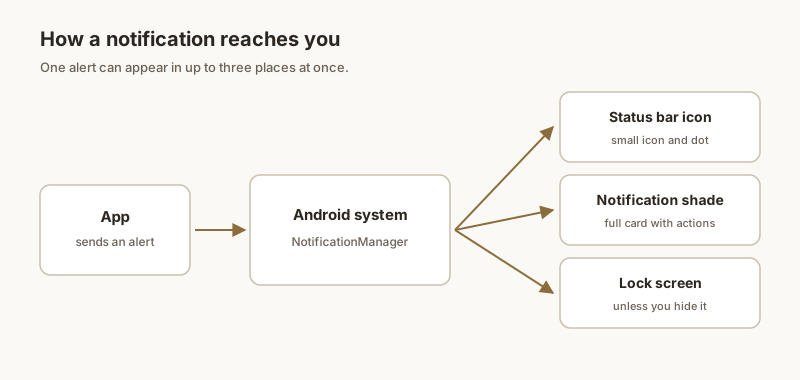
Sometimes you don't want to delete an alert — you just don't want its text showing on the lock screen. Set lock-screen notifications to hide content so the phone shows an icon without the message. The notification still arrives; it just stays private. See our guide on keeping notifications private.
Keep the ones that matter
Stop the noise, but don't lose the alert you actually need — a code, an address, a reminder. With Dingpin you can pin that one notification so it stays at the top of the shade no matter how many other apps you mute. Quiet phone, important alert still visible.
Stop notifications for a specific app
The most direct way: Settings → Apps → [app] → Notifications → toggle off. The app stays installed but cannot post alerts. Reverse any time.
Stop specific channels within an app
For finer control, drill into the channel:
- Settings → Apps → [app] → [channel].
- Set importance to Silent or off.
This keeps useful notifications from the app while silencing the noisy ones.
Stop notifications during calls
Settings → Sounds & vibration → Do Not Disturb during calls (some skins). Or use Focus Mode set to "Calls only." When you are on a call, other notifications do not interrupt.
Stop notifications during quiet hours
DND with a schedule is the most common pattern. Settings → Notifications → Do Not Disturb → schedule. Pick the hours and the rules for exceptions.
Stop notifications based on screen state
Some skins let you stop heads-up banners when the phone is unlocked but in your hand:
- Samsung: Settings → Notifications → Brief pop-up settings → "Do not show while using phone."
- Xiaomi: Settings → Notifications → Floating notifications → off when in use.
Stop notifications on the lock screen
Settings → Notifications → Notifications on lock screen → Hide all. Notifications still arrive in the shade after you unlock, but nothing pops up on the lock screen. Useful for privacy.
For the broader story, see muting notifications for specific apps, how to silence notifications on Android, and Do Not Disturb and Focus Mode.