What the permission is
Notification access (also called a notification listener) is an Android permission that lets an app see the notifications your phone receives — including the app they came from, the title, and the text. Apps like Dingpin ask for it so they can pin, list, or organize your alerts.
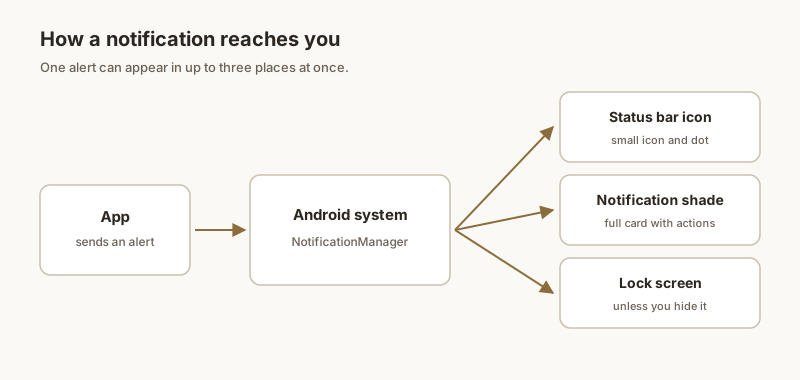
What it can and cannot see
A notification listener sees what is on your notification shade: the sending app, the headline, and the body text of the notification. It does not read your files, your messages inside apps you have not opened, or your passwords. What shows in the shade is what the app can read.
Why manager apps ask for it
To pin or gather notifications, an app must be allowed to read them as they arrive. Without notification access, Dingpin cannot show your recent alerts in one place. The permission is granted in Settings → Notifications → Notification access.
How to grant or revoke it
- Open Settings → Notifications → Notification access.
- Tap the app in the list and toggle it on or off.
- Turning it off stops the app from reading new notifications immediately.
Is it safe?
It is safe when you trust the app. Dingpin stores pinned notifications on your device only — no account, no cloud, no upload. If you are unsure about any app, leave its access off and review which apps already have it.
What Notification Access actually does
Notification Access is a special Android permission that lets an app see every notification posted by every other app. It is the permission a launcher uses to show notification badges, the permission a smart watch app uses to mirror your phone's notifications, and the permission Dingpin uses to capture alerts into its own searchable history.
How it differs from regular notification permissions
Normal notification permissions let an app post notifications of its own. Notification Access is the reverse: it lets the app read notifications posted by others. The two permissions are granted in different places:
- Posting is in Settings → Apps → [app] → Notifications.
- Reading is in Settings → Apps → Special app access → Notification access (path varies by Android version).
How to grant Notification Access
- Open Settings → Apps → Special app access.
- Tap Notification access.
- Find the app you want to grant access to (e.g., Dingpin, your launcher).
- Toggle the switch on. A confirmation dialog explains what the app will be able to read.
Until you tap through the confirmation, the app cannot actually read any notifications. The permission is gated by an extra step to make you aware of the privacy trade-off.
The privacy trade-off
An app with Notification Access can technically read every alert from every app — including messages, OTPs, banking alerts, and personal notes. Before granting it:
- Check the developer. Reputable apps make clear what they store locally vs. upload.
- Look for open source. Dingpin is open source on GitHub, so the code that handles Notification Access is reviewable.
- Check the app's data policy. Some apps process notifications on-device only; others may upload content to a server.
Apps that legitimately need it
Several categories of apps genuinely need Notification Access to work:
- Notification history apps (Dingpin, Buzzkill, Notification History Log).
- Wear OS apps that mirror phone notifications to your watch.
- Automation apps (Tasker, MacroDroid) that trigger actions on specific notifications.
- Some launchers that show notification badges or previews on home screen icons.
How to revoke Notification Access
If you stop using an app or worry about privacy, revoke the permission at any time:
- Settings → Apps → Special app access → Notification access.
- Toggle the app off.
- The app will stop receiving notifications immediately. The app may show a warning or stop working until you re-grant access.
For the broader story on managing notifications, see the best notification manager apps and recovering notification history.