What a notification bundle is
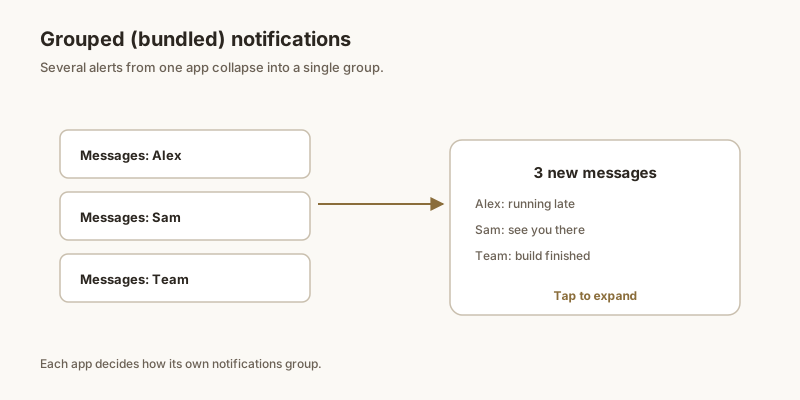
A notification bundle (also called a group) is a stack of related alerts from one app — say, three unread messages or five news headlines — collapsed into a single card in the shade. It keeps a busy app from taking over your whole panel.
How bundling works
Apps opt in to grouping by assigning notifications to a shared group key (Android 7 and later). Instead of listing every item separately, the system shows one card with a count, like “3 messages”. Tap it to expand the individual notifications.
Expanding and managing bundles
Tap a bundle to see its contents, then act on one or clear the whole group at once. You can usually long-press a single item inside the bundle to manage just that one without touching the rest.
When grouping gets in the way
Sometimes an app bundles things you wanted separate, or a bundle hides an alert you needed to see. If a particular app's grouping bothers you, lower its importance or mute that channel; the items then appear individually or silently in the shade.
A tip for the alerts you keep
Bundles are great for clutter, but they can also hide something you must not lose. For any notification you need to keep — a code, a link, a reminder — pin it with Dingpin so it escapes the bundle and stays on top.
What bundling actually does
Bundling (also called grouping) takes multiple notifications from the same app and collapses them into a single entry in the shade. Tap the bundle and it expands into the individual alerts. The system does this automatically when an app posts more than four notifications in quick succession, but apps can also force the grouping earlier.
Why grouping matters for daily use
Without bundling, a busy chat app can fill your shade with 30 individual message alerts, hiding older important notifications underneath. Bundling gives you:
- A cleaner shade with each app as one row.
- The most recent message previewed in the collapsed row.
- The full conversation accessible by tapping once.
Auto-bundling vs. manual channels
Modern Android supports two kinds of grouping:
- Auto. The system decides when to bundle based on the number and timing of notifications. This is the default for most apps.
- Channels. Apps can define separate notification channels for different categories (e.g., direct messages vs. group messages vs. promotional). Each channel can be grouped or shown separately.
Apps that use channels well give you fine-grained control: you can mute promotional chat notifications while keeping direct message alerts loud.
Customizing grouping behavior
You cannot fully control how an app groups, but you can influence it:
- Channel importance. Set high-importance channels to alert loudly; low-importance channels can stay silent. This affects which alerts show at the top.
- Conversation priority. In messaging apps, marking specific conversations as priority keeps them ungrouped.
- App notifications page. Settings → Notifications → App notifications → [app] lets you set defaults per app.
When grouping hides something important
Bundling is convenient until it buries an urgent alert inside 99 chat messages. Strategies for the rare urgent alert:
- Pin important items with Dingpin so they stay above any bundle.
- Set the most important contacts' channels to High importance so their alerts pop out.
- Use starred conversations in your chat app to keep them visible.
For the broader story, see Android notification channels, what to do when notifications are not grouping, and the best notification manager apps.