Grouping (or "bundling") is what turns ten separate pings from one app into a single expandable stack like "12 new messages." When it breaks, your shade fills up with solo alerts. Here's what controls it and how to fix it.
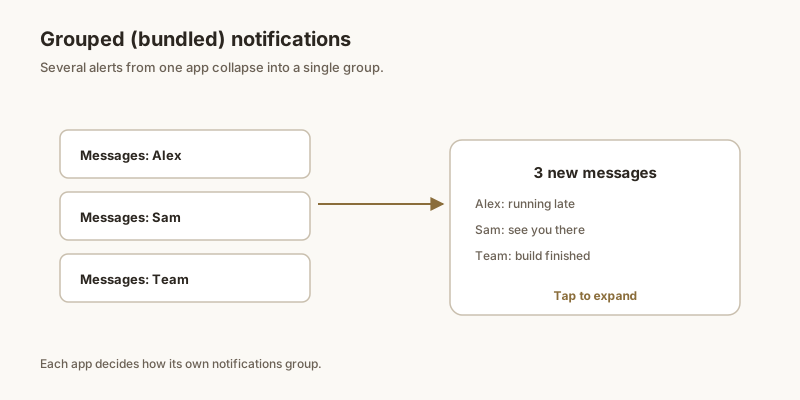
What notification grouping is
When an app groups its notifications, Android collapses them under one entry you can tap to expand. It's driven by two things working together: the app must send alerts as a group, and the notification channel those alerts use must allow grouping. Miss either side and you get a flat list of individual notifications.
Why yours stopped stacking
The usual causes:
- Per-channel settings: if the channel is set to Silent in a way that suppresses grouping, or you changed it manually, the stack can fall apart.
- App-level toggle: some apps have their own "Group notifications" switch that got turned off.
- Separate channels: an app that fires each alert on its own channel (instead of one shared group) won't bundle.
- After an update: a major app update can move alerts to new channels or reset behavior.
How to turn grouping back on
- Long-press a notification from the app → tap the gear / Settings icon.
- Open the relevant notification channel (e.g. "Messages" or "Chats").
- Make sure it isn't set to a mode that disables grouping; keep it on Alerting unless you intend silence.
- Go into the app's own settings and look for a "Group notifications" or "Bundle notifications" toggle — turn it on.
- If it broke after an update, re-check both the channel and the in-app toggle, since updates reset them.
Why grouping sometimes breaks
Auto-grouping depends on the app posting notifications with consistent tags. If an app posts notifications with random tags (or none), the system treats each as a separate alert and they all stack individually. Common reasons grouping breaks:
- The app does not use tags. The developer skipped the tag parameter.
- The app uses different channels. Notifications from different channels group separately by design.
- A bug in the app. Some apps post with one tag and then a single alert without a tag, breaking the bundle.
- The system version changed behavior. Android 12+ changed grouping defaults.
What you can do
For apps that post without grouping:
- Set importance consistently per channel. Lower channels may not group with higher ones.
- Use category-based grouping. Some apps let you enable category grouping in their own settings.
- Report to the developer. If the app should group and does not, the fix is on their end.
When not grouping is correct
Some notifications genuinely should not group. A delivery alert, a calendar reminder, and a chat message are different categories — bundling them together hides each one's context. If an app is over-grouping, the fix is to set channels appropriately.
Bundle vs. stack
Two related but different behaviors:
- Bundle. Notifications from the same app collapse into one row.
- Stack. Multiple bundles from the same category stack together.
If your phone shows multiple separate entries when they should be in one bundle, the app's notification tagging is the culprit. If multiple bundles should stack together, the system-level stack setting is the issue — Settings → Notifications → Stack.
For the broader story, see notification bundles and grouping and notification channels.
When grouping just isn't supported
Important reality: grouping is the developer's choice. Messaging apps group by conversation, but many utility and game apps send standalone alerts that will never bundle — Android has no system-wide "force group" switch. If a specific app simply doesn't group, your options are to mute its less useful channel or, as above, keep the alerts you care about pinned somewhere they can't get lost.