Swiped away a one-time password, a delivery update, or a message on your Xiaomi, Redmi, or POCO, then wished you could get it back? MIUI and the newer HyperOS both ship a built-in Notification History log that records recent alerts — even the ones you dismissed. The catch is Xiaomi buries it a little deeper than stock Android. Here is where to find it and what it can recover.
What Xiaomi keeps (and why it helps)
Behind the MIUI / HyperOS skin sits the same Android 11+ notification history feature found on Pixels and Galaxies. When enabled, your phone saves a timestamped record of recent notifications — messages, app alerts, system updates — so you can scroll back through what you cleared. On Xiaomi it is off by default in many regions, so turning it on is the first step.
Turn it on (HyperOS)
On HyperOS (Xiaomi 14, 13, Redmi Note 13 series, POCO X6 and similar):
- Open Settings.
- Tap Notifications.
- Tap More settings (at the bottom).
- Tap Notification history.
- Toggle on Enable Notification History.
You can also reach it from the notification panel: open the shade, tap the gear or History shortcut, then enable it.
Turn it on (older MIUI)
On MIUI 12, 12.5, 13, and 14:
- Open Settings.
- Tap Notifications.
- Tap Notification history (no "More settings" step on these builds).
- Toggle it on.
If you don't see the entry at all, your specific ROM may have omitted it — see the FAQ below for the fallback.
View cleared notifications
Once enabled:
- From the shade: open the notification panel and tap History (enable "Show in notification shade" if needed in the same settings screen).
- From Settings: Settings → Notifications → (More settings) → Notification history.
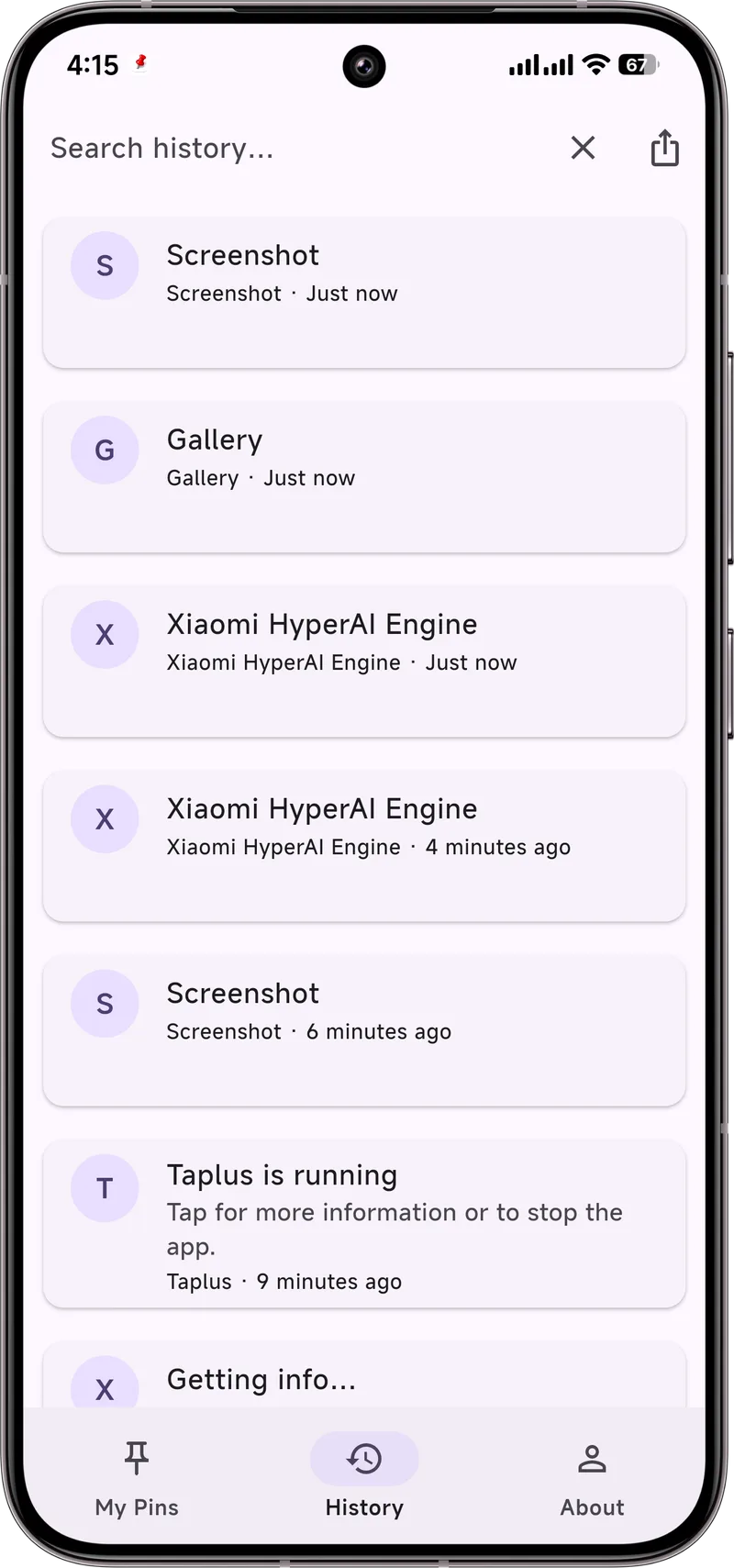
Entries appear in reverse chronological order with the app name, timestamp, and the banner preview that was on screen. There is no search, so scan manually for a long log.
Limits you should know
- Only after enabling: nothing dismissed before you turned it on is saved.
- Roughly a 24-hour window: Xiaomi keeps a rolling buffer, not a permanent archive.
- Preview only: you see the sender and an opening line, not the full conversation.
- Region gaps: a few China-ROM builds ship without the feature, so it may be genuinely absent on your device.
Make it stick with Dingpin
The built-in log is handy but short-lived and read-only — and, on some Xiaomi builds, missing entirely. Dingpin keeps a longer, searchable, and exportable history of your notifications, and lets you pin the ones that matter so they stay at the top of your shade instead of scrolling away. It works the same across Xiaomi, Pixel, Galaxy, and other Android 8+ phones, with no account required.
Where to find it on HyperOS
Xiaomi's notification history lives at Settings → Notifications → Notification history. The path is similar to stock Android but the toggle may be in a slightly different sub-menu. Toggle on to start recording.
Region quirks
HyperOS is the most aggressive of the major Android skins about hiding notification history:
- Mainland China ROMs. Sometimes expose the toggle in a different sub-menu (Settings → Notification & control center).
- Global ROMs. Toggle at Settings → Notifications → Notification history.
- Some carrier-locked ROMs. The toggle may be entirely absent.
If the toggle is missing, your workaround is a third-party notification history app like Dingpin.
Battery optimization aggression
HyperOS is known for aggressive battery management. Even with notification history enabled, the system may pause background recording to save battery. To whitelist:
- Settings → Apps → See all apps → Android System (or similar).
- Battery → No restrictions.
- Settings → Battery → Battery Saver → Excluded apps → add the system service responsible for notifications.
The Autostart permission
HyperOS apps must explicitly be granted Autostart. Without it, third-party notification apps (including Dingpin) cannot run reliably in the background and may miss notifications. To grant:
- Settings → Apps → Permissions → Autostart.
- Toggle on for Dingpin (or any other notification manager).
What gets recorded
HyperOS's history records most notifications, same as stock Android. Things excluded or hidden:
- Sensitive content (banking, OTP, certain messaging) until tapped.
- Persistent foreground-service notifications (music, navigation).
- Apps where you have explicitly disabled notifications at the channel level.
For the broader Xiaomi notification story, see managing notifications on Xiaomi and hiding lock screen notifications on Xiaomi.
Official documentation
If you want to check anything against the source, these are the pages this guide is based on:
FAQ
Does Xiaomi keep notification history forever?
No. Xiaomi's Notification History is a rolling buffer — it stores recent alerts for roughly 24 hours and only logs notifications that arrive after you enable it.
Can I recover a notification I cleared before enabling history?
No. The log starts empty the moment you turn it on; anything dismissed or cleared beforehand is gone and cannot be retrieved on-device.
Why can't I find Notification History on my Redmi?
On some MIUI and region-specific builds the option is hidden under Settings → Notifications → More settings → Notification history, and on a few China ROM versions it is absent entirely. If it is missing, a third-party history app such as Dingpin is the alternative.