"Notification manager" is a loose label covering very different apps. Before comparing, it helps to know what you actually want: to recover alerts you missed, to quiet the noise, or to pin the few that matter. This 2026 comparison breaks the field down so you can pick the right tool — and see where Dingpin fits.
What a notification manager does
At a basic level, these apps use Android's Notification access permission to read, organize, or act on the alerts that arrive on your phone. From there they diverge: some log everything, some auto-dismiss noise, and some keep chosen alerts pinned and searchable.
Comparison criteria
- Pinning — can it keep a chosen alert at the top instead of letting it scroll away?
- History — does it store a searchable log, and for how long?
- Privacy — local-only processing, no account, no server uploads of your alerts.
- Price — free, one-time, or subscription.
- Ease — setup time and daily friction.
The three categories
1. Loggers. Capture every notification into a searchable, often exportable list. Best when you need to find an old OTP or message. The trade-off: they show you everything, which can feel like drinking from a firehose.
2. Filter / rules apps. Auto-dismiss, group, or redirect noisy alerts. Great if your problem is volume. They're less useful for "keep this one specific thing visible."
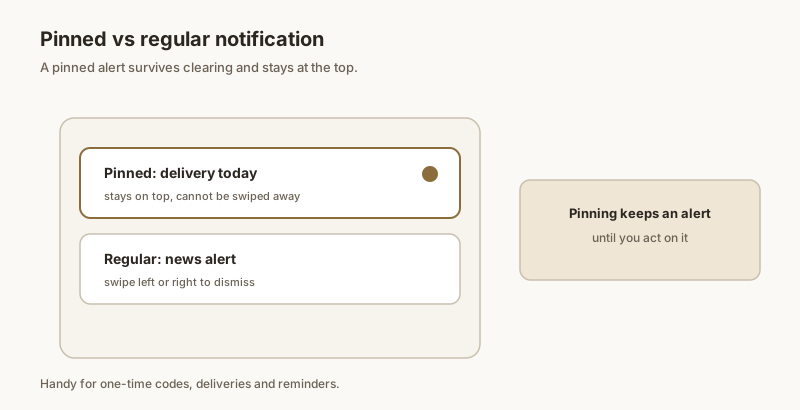
3. Pin & focus apps. Let you mark important notifications so they stay at the top of your shade — a lightweight to-do for alerts. This is where Dingpin lives, and it's the category most people actually need day to day.
How Dingpin compares
For the common goal — "don't let important things get lost" — Dingpin is built around pinning rather than drowning you in logs:
- Pinning: OTPs, deliveries, reminders, and key messages stay at the top of your shade.
- Local history: a searchable, on-device log you control.
- Privacy-first: free, no account, no server uploads — your alerts never leave the phone.
- No root: works on any Android 8+ phone with standard notification access.
- Lightweight: one-tap pinning, no complicated rule engine to maintain.
Loggers beat Dingpin at bulk history; filter apps beat it at noise control. But for keeping the few alerts that matter visible, pinning is simpler and less noisy than either.
How to choose
- Need to find a lost message from days ago? Pick a logger.
- Drowning in spammy app alerts? Pick a filter/rules app.
- Want the important few (OTPs, deliveries, work chats) always visible? Pick a pin app like Dingpin.
- Many people run a logger and Dingpin together: logger for the archive, Dingpin for the live top-of-shade pins.
Notification managers in 2026
The category has stabilized. A few apps still lead, with each owning a distinct niche:
- Dingpin. Pin + history + export. Open source, no account, on-device storage.
- Notification History Log. Simple viewer for the system log. Minimal features.
- BuzzKill. Automation engine for power users. Tasker-like rules on notification events.
- Notify for Samsung. Samsung-specific notification companion. Good Lock integration.
For most people
Dingpin hits the sweet spot. It does the three jobs most users actually need — pin important notifications, search past history, export on demand — without the complexity of an automation engine or the limitations of a passive viewer.
For power users
BuzzKill is the right answer if you want to set up rules like "silence Twitter notifications between 9pm and 7am" or "auto-save OTP codes to a file." It requires more setup but supports arbitrarily complex workflows.
For Samsung-only users
If you are deeply invested in Good Lock, Notify for Samsung complements it. But Dingpin still offers more — particularly searchable history and export — making it a stronger choice even on Samsung.
Open source matters
Notification managers read every alert on your phone. Open-source code (Dingpin is on GitHub) lets you verify the app does what it claims. Closed-source alternatives require trust; for a tool that handles sensitive alerts, code you can inspect is reassuring.
How to choose
Three questions to pick the right one:
- Do you need search and export? Yes → Dingpin or BuzzKill.
- Do you need automation rules? Yes → BuzzKill.
- Do you want a passive viewer? Yes → Notification History Log.
For most users, Dingpin is the right default. See also: best notification history apps and best notification manager apps.
Official documentation
If you want to check anything against the source, these are the pages this guide is based on:
FAQ
What is the best free notification manager for Android in 2026?
It depends on your goal. If you want to recover and search lost alerts, a notification logger is best. If you want to silence noisy apps, a filter/rules app fits. If you want to keep a few important alerts visible at the top, a pin-and-focus app like Dingpin is the best fit — and it is free with no account required.
Is Dingpin safe for my notifications?
Yes. Dingpin processes notifications locally on your device, requires no account, and does not upload your alerts to a server. It only needs Notification access to read and pin the alerts you choose.
Do notification manager apps need root?
No. All the popular ones, including Dingpin, work on unrooted phones using Android's standard Notification access permission. Root is never required for pinning, logging, or filtering notifications.