What the notification shade is
The notification shade is the panel that slides down from the top of your Android phone. Swipe down once from the top edge and you get the quick settings tiles; swipe down again (or swipe with two fingers) and you open the full shade with all your notifications. It is the single place where every alert lands.
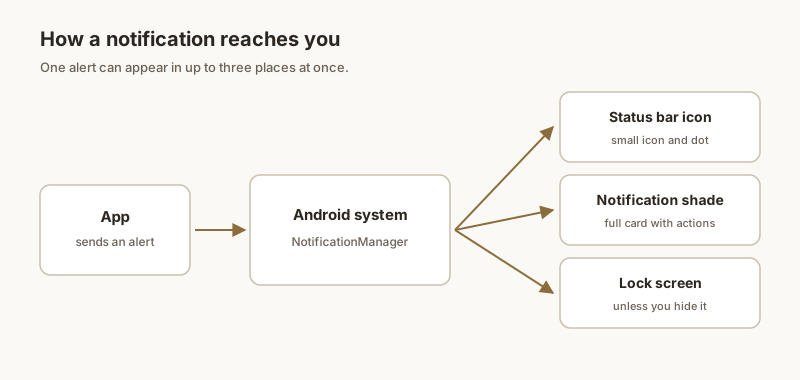
Notification shade vs. status bar
The thin status bar at the very top only shows tiny icons — a bell, a Wi-Fi symbol, a battery. The shade is what appears when you pull that bar down: the scrollable list of full notifications. People often say "status bar notifications" when they mean the shade, but they are two different things.
How to open it
- Once: swipe down from the top to reveal quick settings.
- Twice: swipe down again to expand the full notification list.
- Two-finger swipe: opens the full shade in one move on most phones.
When the shade gets messy
With a dozen apps pinging all day, the shade fills up fast. Older alerts sink to the bottom and the one you cared about — an OTP, a parking spot, a reminder — scrolls out of sight. That is where pinning helps.
Keep what matters at the top
With Dingpin, pin a notification and it stays at the top of the shade until you clear it. The rest can scroll away; the important one holds its place.
What the notification shade is
The notification shade is the panel that appears when you swipe down from the top of the screen. It holds two distinct things:
- The notification list. All currently active alerts, sorted by time. Top of the screen.
- Quick settings. The grid of toggles (Wi-Fi, Bluetooth, flashlight, etc.). Often a separate row you pull down further.
On most Android phones, a single swipe from the top reveals notifications; a second swipe reveals quick settings. On some brands the order is reversed.
How notifications get there
When any app posts a notification, Android routes it to the shade through the notification system. The shade displays the visible alert and stores it (along with the underlying notification data) until you swipe it away or the system removes it. The shade is the central, always-reachable view of everything your phone is trying to tell you.
Shade vs. notification history
The shade and the notification history are different:
- Shade. Live alerts. Swipe to clear.
- Notification history. Settings → Notifications → Notification history. A separate 24-hour log of what arrived, including alerts you already cleared.
If you dismiss an alert from the shade, it is gone from the shade but may still be in the history (until 24 hours pass). For a permanent searchable record, a third-party app like Dingpin is the answer.
Customizing the shade
A few settings affect what the shade looks like:
- Number of visible notifications. Some launchers and brands let you set how many recent alerts to show without scrolling.
- Snooze buttons. The default shade has a snooze option on each notification (long-press or slow-swipe).
- Direct reply. Some apps add a quick reply field to their notification in the shade.
Pinned notifications in the shade
Pinning a notification keeps it at the top of the shade above all other alerts. The pinned item does not disappear when you swipe others away. Dingpin makes this one tap. See how to pin notifications on Android and recovering notification history for more.