Plain SMS and RCS texts are the most basic thing Android Auto should handle — yet they're a frequent complaint: no banner, no chime, no read-aloud. The fix is almost always on the phone side: the wrong default app, a silenced Messages notification, or a Driving mode eating the alert before the car sees it. Here's the order that works.
Why SMS goes missing in the car
Android Auto reads your texts from whichever app is the system default SMS app. If that app's notifications are off, silent, or deferred, the car gets nothing. Common causes:
- The default SMS app isn't the one you actually use (e.g., a leftover carrier app is default).
- Google Messages notifications set to Silent or "Minimize" in notification settings.
- Driving Do Not Disturb auto-on with Bluetooth, muting everything.
- Android Auto's "Show notifications" or Notification access disabled.
Confirm the default SMS app
- Phone Settings → Apps → Default apps → SMS app (wording varies: "Default messaging app").
- Make sure it's the app you use — usually Messages (Google). If a different app is default, Android Auto may be reading from the wrong place.
- Set it to your real messaging app, then reopen Android Auto's notification settings and confirm "Show notifications from your phone" is on.
Google Messages notification settings
Even with the right default app, Messages can be silenced:
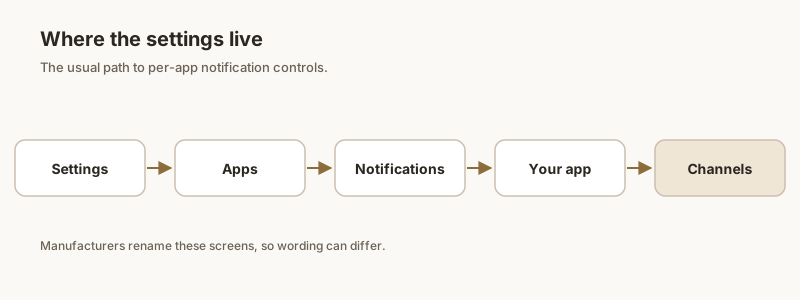
- Phone Settings → Apps → Messages → Notifications. Confirm the master Show notifications toggle is on.
- Tap Notification categories: ensure Incoming messages (and Conversations, if present) are set to Alert / Make sound, not Silent or "Minimized".
- In the Messages app itself, open Settings → Notifications and confirm Show notifications and Notify for conversations are enabled. Disable Hide notifications if it's on.
Driving Do Not Disturb
This is the silent killer for SMS in the car:
- Phone Settings → Notifications → Do Not Disturb → Schedules / Driving.
- If a Driving rule turns DND on when Bluetooth connects, it mutes texts before Android Auto mirrors them — even though the phone may still vibrate.
- Disable the rule, or add Android Auto and Messages as exceptions so alerts still come through. Also check the global DND isn't manually on.
RCS and carrier quirks
If regular SMS works but RCS chats (the "Chat" / blue bubbles in Messages) don't announce:
- RCS messages still arrive as Messages notifications, so the same notification settings above apply — make sure Chat conversations aren't minimized.
- Some carriers or regions delay RCS; if texts only fail when on certain networks, it's a carrier/RCS provisioning issue, not Android Auto. Toggle Settings → RCS chats off and on, or restart the phone to re-register.
- A few car head units only surface calls and media over their Bluetooth profile and won't show any app messages — no setting forces it.
If the car won't surface a text or a verification code you can't miss, Dingpin lets you pin important messages and OTPs on your phone so they're waiting in one place when you park, instead of lost in the car's silence.
Official documentation
If you want to check anything against the source, these are the pages this guide is based on:
FAQ
Why don't my text messages show on Android Auto but calls do?
Calls and media use a different Bluetooth profile than app notifications. If texts are missing but calls work, the issue is the SMS app's notification settings or Driving Do Not Disturb muting alerts — not the connection. Confirm the default SMS app is correct and its notifications aren't Silent, and check the Driving DND schedule.
How do I make Android Auto read my texts aloud?
Enable 'Read aloud incoming notifications' in Android Auto's notification settings, ensure the default SMS app's notifications are enabled and not Silent, and make sure Google Assistant is set up with a working car microphone. The text will then be spoken and you can reply by voice.
My RCS chats don't notify in the car but SMS does — why?
RCS messages still come through the Messages app as normal notifications, so check that Chat / conversation notifications aren't minimized or silenced in Messages' notification categories. If they fail only on certain networks, it's likely RCS provisioning with your carrier rather than Android Auto.
Which app should be my default SMS for Android Auto?
Whichever messaging app you actually use for texts — most commonly Google Messages. Android Auto reads texts from the system default SMS app, so if a different or leftover carrier app is set as default, your real texts may not appear in the car.