WhatsApp is the app most people specifically want in the car — but it's also the one most often silent on Android Auto. The cause is rarely Android Auto itself. It's usually a WhatsApp notification setting, battery saving, or a Driving mode swallowing the alert before the car ever sees it. Here's the fix, in the order that actually works.
Why WhatsApp goes silent in the car
Android Auto only mirrors notifications the phone is already showing. So if WhatsApp is muted, set to Silent, or deferred by battery saving on the phone, the message exists but never reaches the car screen or speakers. The usual suspects:
- WhatsApp's notification categories (Messages, Group notifications) turned off or set to Silent.
- Battery optimization deferring WhatsApp in the background.
- Driving Do Not Disturb auto-enabled when Bluetooth connects, muting everything.
- Android Auto's "Show notifications" or Notification access off.
Check WhatsApp notification categories
WhatsApp splits alerts into categories, and Android Auto respects each one separately:
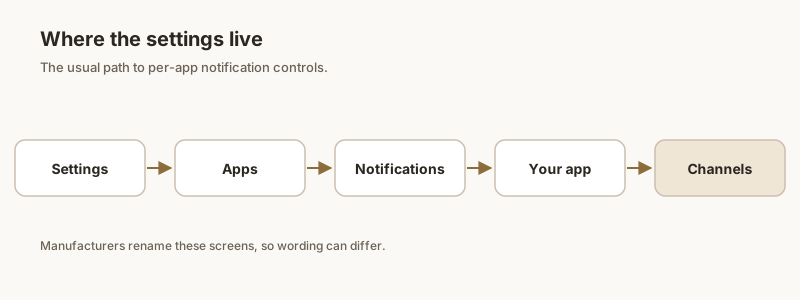
- Phone Settings → Apps → WhatsApp → Notifications.
- Tap Notification categories (or "Categories"): ensure Messages is enabled and set to Alert / Make sound, not Silent.
- Do the same for Group notifications if you want group chats in the car. If this category is off, one-to-one messages may still show while groups stay silent — a very common "some WhatsApp works, some doesn't" case.
- Also confirm the main WhatsApp Show notifications master toggle is on and the app isn't set to Silence notifications globally.
Turn off battery optimization
Android's battery saver can delay or drop background notifications from chat apps:
- Phone Settings → Apps → WhatsApp → Battery (or App battery usage).
- Set to Unrestricted or Don't optimize. This stops the system from deferring WhatsApp alerts when the screen is off or the phone is connected to the car.
- Also check Settings → Battery → App launch / Manage apps (on some brands) and allow WhatsApp to run in the background.
Driving Do Not Disturb
Many phones auto-enable Driving Do Not Disturb when they pair with the car's Bluetooth. That mode silences alerts before Android Auto can mirror them:
- Phone Settings → Notifications → Do Not Disturb → Schedules / Driving.
- If a Driving rule turns DND on automatically, either disable it or add Android Auto (and your messaging apps) as exceptions so alerts still come through.
- While you're there, confirm the global Do Not Disturb isn't manually on.
Read-aloud for WhatsApp
Seeing the bubble but no voice? Read-aloud uses Google Assistant:
- In Android Auto's notification settings, enable "Read aloud incoming notifications."
- Make sure Assistant is set up and the car mic works — say "Hey Google" to test.
- WhatsApp voice replies also depend on this; tap the mic or say "Reply" after an alert to dictate.
If the car simply won't surface a WhatsApp code or message you can't miss, Dingpin lets you pin important chats and OTPs on your phone so they're waiting in one place when you park, rather than buried in the car's silence.
Official documentation
If you want to check anything against the source, these are the pages this guide is based on:
FAQ
Why do some WhatsApp messages show on Android Auto but not others?
WhatsApp splits alerts into notification categories. If only the 'Messages' category is enabled and 'Group notifications' is off or Silent, your one-to-one chats appear in the car while group messages stay silent. Enable the group category in Settings, Apps, WhatsApp, Notifications, Notification categories to fix it.
Why is WhatsApp silent on Android Auto but I still get the phone notification?
That points to Driving Do Not Disturb or Android Auto's own settings. Driving DND can mute the car mirror even though the phone still buzzes. Check Settings, Notifications, Do Not Disturb, Schedules, Driving, and make sure Android Auto isn't being silenced. Also confirm 'Show notifications from your phone' is on in Android Auto.
How do I make Android Auto read WhatsApp messages aloud?
Enable 'Read aloud incoming notifications' in Android Auto's notification settings, and make sure Google Assistant is set up with a working car microphone. The message will then be spoken through the car speakers; you can reply by voice afterward.
Does battery optimization block WhatsApp on Android Auto?
Yes. If WhatsApp is battery-optimized, the system may defer its background notifications, so they arrive late or not at all on the car screen. Set WhatsApp to Unrestricted or Don't optimize in Settings, Apps, WhatsApp, Battery to keep alerts prompt.