A very common pattern: 1-on-1 texts show up fine in the car, but group chats stay silent. That's not random — group messages are delivered differently, and Android Auto is pickier about them. Here's the fix.
Why groups behave differently
Group conversations generate far more notifications, so apps and Android Auto handle them differently:
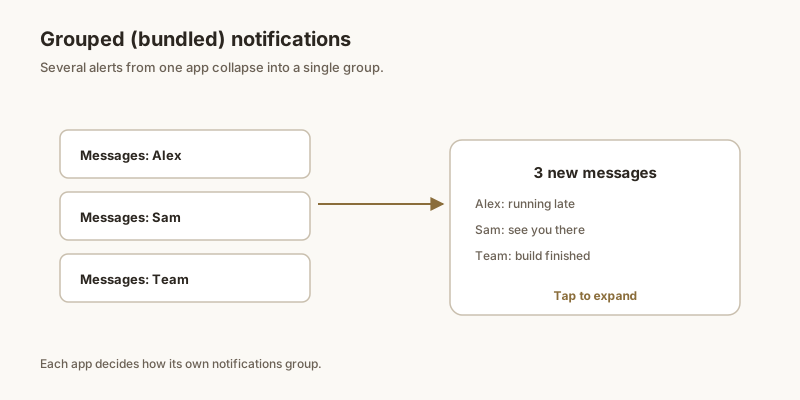
- Apps often send group messages as a bundled "summary" notification rather than individual messages.
- Android Auto tends to skip summaries when deciding what to show and read aloud.
- Per-chat mute or low priority settings apply to groups by default in many apps.
Bundled summaries
The biggest culprit is the "smart" bundling:
- In your messaging app's notification settings, look for "Group notifications" or "Notify for group messages".
- Set it to notify for every message (or at least the first message in a group), not just a periodic summary.
- Disable "Bundle notifications" / "Show as a single notification" if the app offers it for groups.
- On Samsung, make sure the group's notification category isn't set to Silent (see the Samsung guide).
Per-chat settings
Mute rules are usually per-chat, not global:
- Open the noisy group chat and check its individual notification settings — it may be muted or set to "Low priority."
- Make sure the chat isn't in a muted state (many apps show a crossed-out bell).
- For important groups (family, work), set them to Alert / High priority explicitly.
WhatsApp specifics
WhatsApp has its own layers:
- WhatsApp → Settings → Notifications: set Group notifications to show content and sound.
- Per-group: open the group → tap the name → Custom notifications → ensure it's not muted and uses high-priority.
- Turn off "Use high-priority notifications" off only if you want the opposite — leaving it on helps Android Auto surface the message.
- Also confirm WhatsApp itself reaches Android Auto: Android Auto → Settings → Notifications → Configure, and toggle WhatsApp on.
Telegram & others
Telegram and similar clients:
- Telegram → Settings → Notifications and Sounds → Private/Group chats: ensure groups aren't set to "No sound" or "Smart" with aggressive bundling.
- For Google Messages, group texts (MMS) follow the conversation's category — keep it on Alert.
- If you still miss a critical group message, Dingpin lets you pin it on your phone so it's parked at the top to check when you park — no reliance on the car catching every group ping.
Why group chat notifications multiply
Group chats are notorious notification offenders. A chat with 20 participants can post dozens of messages per hour, each triggering a separate alert by default. Without grouping, the chat app's notifications quickly bury everything else in your shade.
Fix it per channel
- Settings → Apps → [chat app] → [group messages channel].
- Set importance to Medium or Low.
- Turn off pop-up (heads-up) for the group channel.
Direct messages stay loud; group messages are silent until you open the app.
Fix it per conversation
Most chat apps let you mute individual conversations:
- Long-press a chat → mute.
- Choose duration: 8 hours / 1 week / always.
Use this for the noisy groups where you want to read later but not interrupt.
Android Auto context
Android Auto in the car is particularly sensitive to group chat volume. By default, it reads new messages aloud — which becomes chaotic with active groups. To prevent:
- When connected to Android Auto, set the chat app to driving mode in its own settings.
- Or mute group channels entirely.
- Or disable "Read aloud" in Android Auto's notification settings.
Dingpin for important group messages
When a specific message in a group matters — an address, a coordinate change, a "running 10 min late" — pin it with Dingpin so it stays at the top of the shade above the noise.
For related guides, see muting WhatsApp group notifications, muting specific apps, and Android Auto notifications not showing.
Official documentation
If you want to check anything against the source, these are the pages this guide is based on:
FAQ
Why do 1-on-1 texts show in Android Auto but not group chats?
Apps often send group messages as a bundled "summary" notification, and Android Auto tends to skip summaries when deciding what to show and read aloud. Per-chat mute or low-priority settings also apply to groups by default. Set the app to notify per group message and un-mute the chat.
How do I make WhatsApp group messages appear in Android Auto?
In WhatsApp, Settings, Notifications, set Group notifications to show content and sound, and per group enable Custom notifications without mute and with high priority. Also confirm WhatsApp is enabled under Android Auto, Settings, Notifications, Configure.
Why are my group chats muted in Android Auto but not on the phone?
It's usually the app's group bundling or a per-chat mute that Android Auto respects more strictly than the phone shade. Group summaries may also be set to Silent at the notification-category level (especially on Samsung). Un-mute the group and disable bundled summaries for groups.
Does Android Auto read group messages aloud?
Only if the group message arrives as an individual message notification rather than a summary, and read-aloud is enabled. If your app bundles group chats into one summary, Android Auto typically won't speak them. Switch the app to per-message group notifications so each arrives as a speakable alert.