A silent car is a missed message. Android Auto may show the banner but play no chime and no voice — and "showing but silent" is a different problem from "not showing at all." Here's how to get sound back.
Why alerts go silent
Android Auto has at least three independent volume and routing controls, and a notification can be visible while every one of them is muted:
- The phone's notification volume (separate from ringtone and media).
- The car's active audio source and Bluetooth profile.
- Android Auto's own "Play notification sounds" and read-aloud toggles.
- Do Not Disturb or a driving mode suppressing sound.
- Audio focus being held by navigation or music.
Notification vs media volume
This catches most people. When a notification arrives:
- Press the phone's volume-up button while the alert is playing (or right after) so you adjust the notification stream, not media.
- If that's awkward, go to Settings → Sound & vibration → Volume and raise the Notification slider (not Ring or Media).
- Make sure the messaging app's notification sound isn't set to None: app settings → Notifications → the message category → Sound.
Car audio source
The head unit may be on a source that doesn't carry notification audio:
- On the car screen, confirm the audio source is set to Bluetooth / Android Auto and not FM radio or a muted input.
- Some cars route phone-call audio and media audio over different Bluetooth profiles; if notification sound is missing, try toggling the car's "Media audio" Bluetooth permission for the phone off and on.
- If you use a wired connection, reseat the cable — a flaky USB connection can drop the audio channel while the screen still works.
Read-aloud & sound toggles
Android Auto has its own switches:
- Android Auto → Settings → Notifications → enable both "Show message notifications" and "Play sound for notifications" (label varies; look for any "sound" option).
- If you want it spoken, also enable "Read aloud incoming notifications" — see the dedicated read-aloud guide.
- A system or app update may have flipped these off; re-check them after any update (covered in the post-update guide).
Do Not Disturb
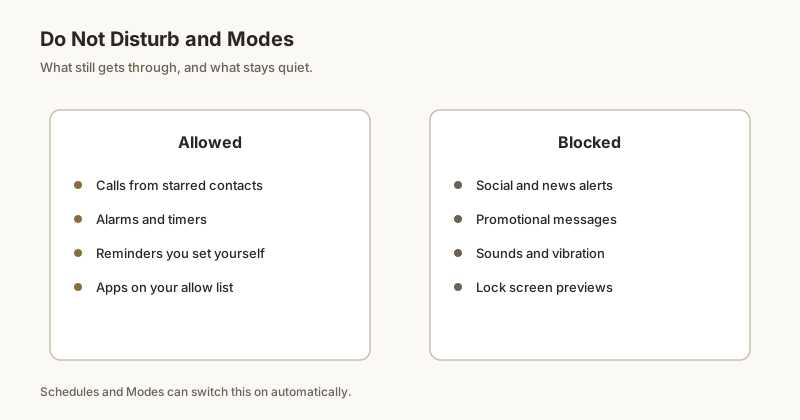
DND can let the banner show but mute the sound:
- Settings → Sound & vibration → Do Not Disturb → Exceptions → allow Conversations / Messages and Alarms & other interruptions.
- In Android Auto settings, disable the driving Do Not Disturb mode or set it to "Priority only" with messages allowed.
Audio focus with maps/media
If sound works only when nothing else plays, audio focus is the issue:
- Loud navigation prompts or music can temporarily suppress notification chimes. Lower media volume slightly or pause music when you expect an important message.
- Some head units prioritize phone-call audio above everything; if you were just on a call, the notification may have been deprioritized.
If the alert is silent and you're driving, you may not notice it at all — that's where Dingpin helps: pin the message on your phone so it's still there, at the top, when you stop. No account, fully on-device.
Official documentation
If you want to check anything against the source, these are the pages this guide is based on:
FAQ
Why does Android Auto show notifications but make no sound?
The banner and the sound are controlled separately. The usual causes are the phone's notification volume being muted (it's a different slider from ringtone and media), the car audio source not carrying notification audio, Android Auto's "Play sound for notifications" toggle being off, or Do Not Disturb allowing the alert to show but not sound.
How do I raise just the notification volume?
Press the volume-up button while a notification is playing, or go to Settings, Sound and vibration, Volume, and raise the Notification slider specifically. Also check the messaging app's notification category sound isn't set to None.
Why is there no sound only when music or maps is playing?
That's audio focus. Loud navigation prompts or media can temporarily deprioritize notification chimes. Lower the media volume a little or pause music when you're expecting an important message. Some car head units also route phone audio above media, which can swallow notifications right after a call.
Does Do Not Disturb stop Android Auto sound but keep the banner?
Yes. Depending on your DND exceptions, Android can show the notification on the car screen while muting its sound. In Settings, Sound and vibration, Do Not Disturb, Exceptions, allow Conversations and Messages, and check Android Auto's driving Do Not Disturb setting.